As a beginner After Effects artist, you may wonder – How the heck do I create a triangle?! There’s a simple option for a square, rectangle, circle, oval, and even a pentagon! A pentagon! When am I going to use a pentagon!?
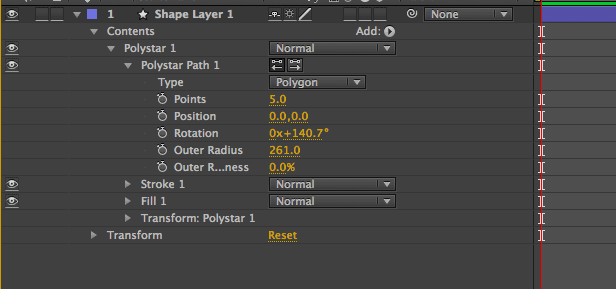
At least, those were my thoughts when I began using After Effects for a lot of motion graphics and video effects projects. Now I use After Effects all the time. I’m using the circle and square shape and mask tools almost every time I open After Effects. And a triangle isn’t always something I want, but there have been times that I needed it. So here’s how you create a simple equilateral triangle in After Effects.
Now you have a perfect equilateral triangle that you can use in your motion graphics.
Check out the images below for more help.
Enroll in After Effects Complete Course – the perfect beginners course for anyone learning about motion graphics and animation.
What do you think? Let me know in the comments!
Thank you for reading this article and if you are interested in more topics like this, please subscribe to my mailing list. I don’t spam. I don’t overload you with emails. I just send out occasional emails with great tips and advice.
Cheers!
Phil
🎉 Are you ready to party? 🎉 I'm doing a Purple Friday Party to celebrate…
Learn more about our Advanced Videography Course: Do you ever watch a video and wish…
*** The Complete Instagram Marketing Course is now LIVE. Grab it for just $9.99 for…
You can make better YouTube videos from home with any equipment. Join our new complete course!…
Do you have a Sony camera? Do you want to be comfortable and confident using it to…
This Digital Marketing course will help you get more business leads and convert them to…