Using the alt (if you’re using a PC) or option (if you’re using a Mac) key will really improve the way you edit. It makes you more efficient. Mostly, it just makes things easier. One of the best ways to use the option key is to quickly trim layers and/or to duplicate layers.
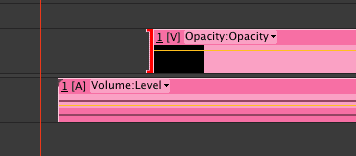
In the above image, you’ll see a typical piece of footage that has video and audio. If you were to just click on the edge of either the video or audio track and drag left or right, it would lengthen or shorten both the audio and video. But if you option-click and drag just the video of the clip, it will allow you to edit only the video (as in the example above).
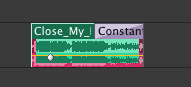
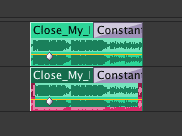
The above two images show how to easily duplicate a clip using this same technique. Sure you could just copy and paste the clip. But to be even quicker, just option/alt click a clip and drag it to another track or another part of the same track. Above you see that I’ve duplicated audio onto another track. Note that this is different than the first image above where I was alt/option-clicking the edge of a clip, and not in the center of a clip.
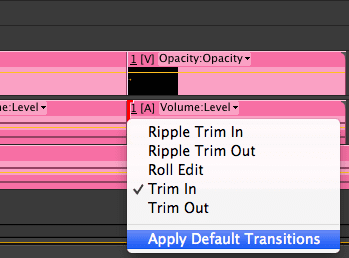
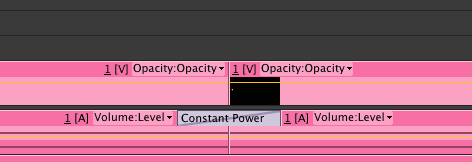
You can also use the alt/option-click method to select the edge of a specific clip and then quickly at a transition. For example, I often use this when I want to add an audio fade to two clips butted up against each other, but I don’t want to cross-fade the video. So I just option/alt-click the audio track where the clips touch, then right-click and apply default transitions. It saves about 5 seconds compared to just right clicking the clip edges and adding default transitions to both video and audio… then having to delete the crossfade on the video. (or you could just add a simple audio fade by dragging and dropping the constant power effect from the effects and presets window. But I find that this takes even longer than the right-click method.)
I hope you enjoyed this quick little tip. Let me know if you have any tips in the comments below!
Cool! Well I hope you enjoyed this quick tip. If you’re interested in learning more about video editing in Adobe Premiere Pro, check out my complete course:
Cheers,
Phil
🎉 Are you ready to party? 🎉 I'm doing a Purple Friday Party to celebrate…
Learn more about our Advanced Videography Course: Do you ever watch a video and wish…
*** The Complete Instagram Marketing Course is now LIVE. Grab it for just $9.99 for…
You can make better YouTube videos from home with any equipment. Join our new complete course!…
Do you have a Sony camera? Do you want to be comfortable and confident using it to…
This Digital Marketing course will help you get more business leads and convert them to…